Design Tokens & theme.json
Brand your site by editing one JSON file. Semantic colors, typography presets, and Google Fonts wired through CSS custom properties.
What lives in theme.json
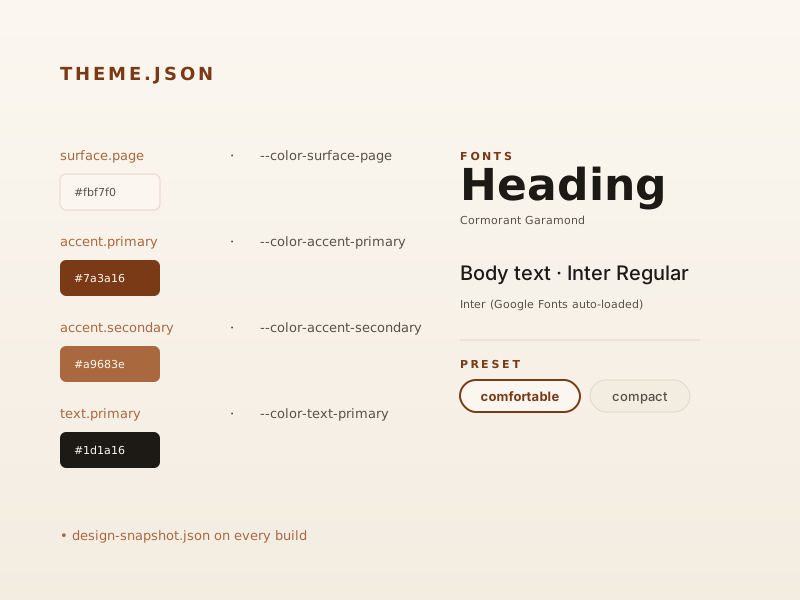
A single JSON file controls the site’s visual identity:
{
  "semanticColors": {
    "surface": { "page": "#fbf7f0", "wash": "#f3ece1" },
    "text": { "primary": "#1d1a16", "muted": "#5a5048" },
    "accent": { "primary": "#7a3a16", "secondary": "#a9683e" },
    "border": { "default": "#e1d7c9" }
  },
  "typography": {
    "preset": "comfortable",
    "fonts": { "heading": "Cormorant Garamond", "body": "Inter" }
  }
}
The schema in @portfolio-engine/schema validates the file at build time. Each token becomes a CSS custom property (--color-surface-page, --color-accent-primary, etc.) that every theme component reads through var(...).
Google Fonts, no extra wiring
fonts.heading and fonts.body accept any Google Fonts family. The theme generates the stylesheet URL via editorialGoogleFontsStylesheetHref() and injects the <link> tags into every page. No <head> editing required.
Design snapshot
On every build the engine writes .portfolio-engine/design-snapshot.json — a flattened key/value map of the resolved tokens. Admin tools reads it and renders token cards live, so a non-technical editor can see exactly which color the page is using and what the variable is called.